AI-powered Booking Engine capability

PriceMatch that does not just compare. It acts.

Use AI to detect the OTA context, select the configured direct-booking response, retain proof and connect the outcome to the booking.

Check · Adjust · Prove · Book · Attribute

Whizz AI · Rate

A lower price on a phone is found while the guest is still deciding.

PriceMatch reads the price the guest is actually shown, on rate, geo, device and member fare, applies the response the hotel configured, and keeps a snapshot of both prices.

Whizz AI
Just now

Detected: Live check on Booking.com: a lower price for the same Deluxe Room and dates at BW Lakeside Resort, on a mobile member fare.

Activated: The response Lakeside configured for a mobile, member-fare mismatch is applied on the rate the guest is looking at. A snapshot of both prices is kept.

Direct advantage protected, snapshot kept
Live today on Booking.comRate, geo, device, member fareBooking engine only

Rate

Compare the rate the guest can actually see against the direct booking offer.

Geo

Account for location-specific OTA pricing where the connected source supports it.

Device

Identify differences caused by mobile and device-specific OTA offers.

Fidelity

Recognise signed-in OTA member pricing, including supported loyalty levels.

How it works

Check, adjust, prove, book.

Four steps on the live rate, while the guest is still deciding. Detection is live today on Booking.com, with more added as each goes live.

  1. Step 1

    Check

    Read the price the guest is shown on each major OTA, on rate, geo, device and member fare.

    OTA
    $358
    Direct
    $364
  2. Step 2

    Adjust

    Apply the response the hotel configured, on the live rate the guest is looking at.

    Direct

    matched in real time

    $358

  3. Step 3

    Prove

    Keep a snapshot of both prices and the context they were seen in.

    09:14 · Rate · OTA

    $358 seen, $364 direct

    Matched. Snapshot kept.

  4. Step 4

    Book

    The guest books direct. The booking carries the response that was applied.

    Deluxe Room

    Earn 3,580 points

    Booked direct

Parity-safe

The member rate is the parity-safe answer.

  • PriceMatch AI matches or beats any OTA. Live today on Booking.com, with more added as each goes live.
  • Member value is points and perks, not a lower number on the page.
  • A parity clause governs the rate. It does not govern late checkout or the points a member earns.

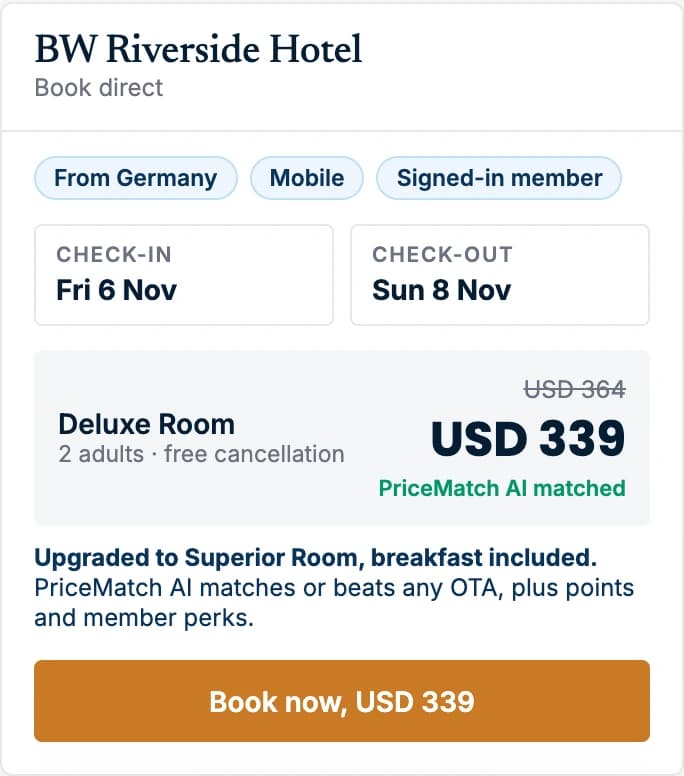
BW Riverside Hotel

12 - 14 Oct · 2 adults

Directmatched against the OTA in real time

Booking.com public rate
$364
Direct public rate
$364

Public rate matched. Member value is points and perks.

Signed in: Riverside Rewards member

Member value sits under the rate, not in it.

Deluxe Room

Member rate

Earn 3,640 pointsLate checkoutFree cancellation

$364

taxes and fees in

On the room

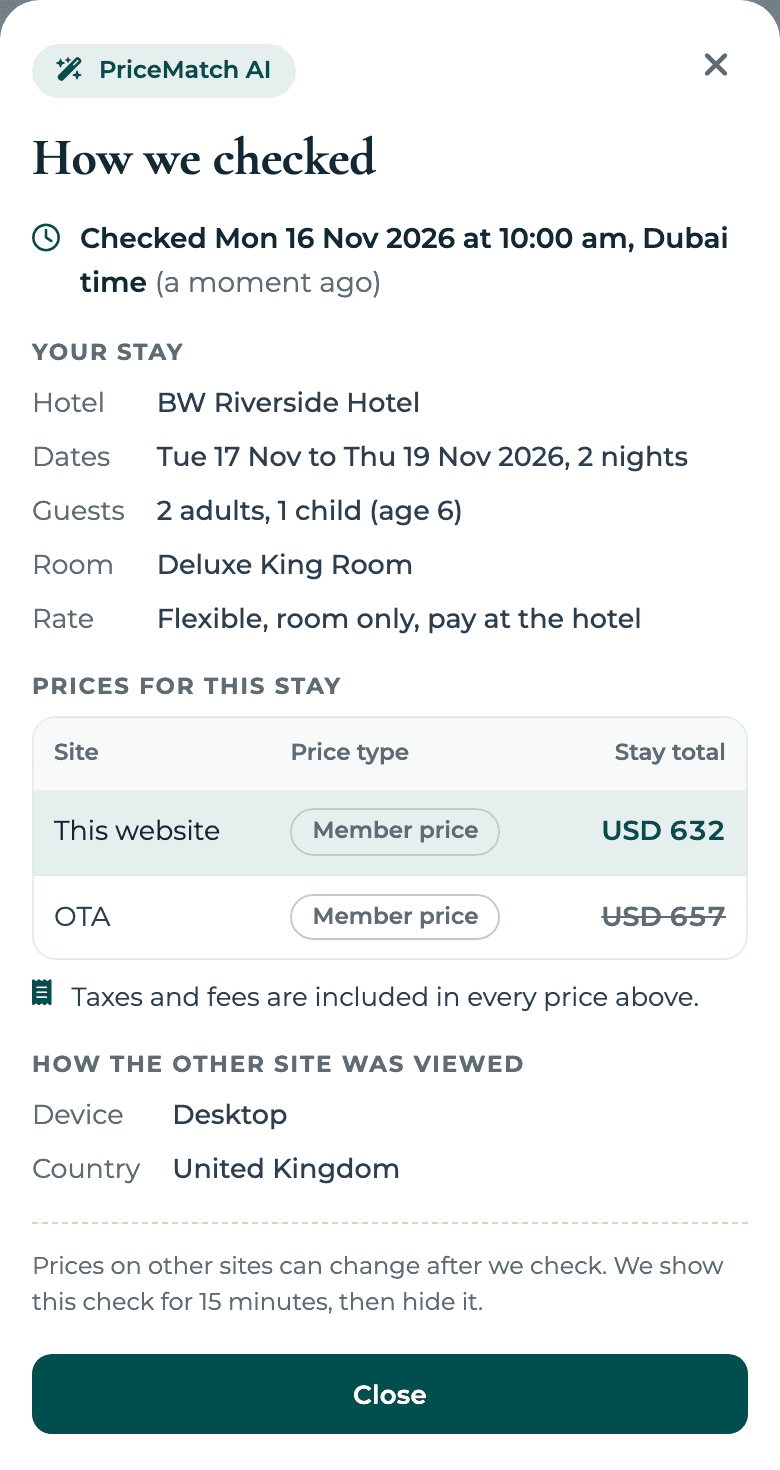
The guest sees the check, not a promise.

  • Next to the rate, a line shows the OTA we checked, the price it showed and how long ago we checked.
  • It only appears when a stored check backs that exact stay. No check, no line.
  • Change the dates, the guests, the room or the rate and the line goes until we check again. After 15 minutes it goes on its own.
BookingWhizz rooms step on BW Riverside Hotel, a demo hotel, with a PriceMatch AI line under the rate naming the site checked and its price.
Designed booking flow. Demo data, not a result.

What actually breaks parity

On desktop it looks clean. You only catch it on a phone.

Parity is rarely broken by the headline rate. It is broken underneath it, by a funded programme or an offer that only a certain guest, on a certain device, in a certain country, is ever shown. Mobile is where it goes first. How hotel price matching works, check by check.

The six ways parity breaks
Genius
Booking.com’s own loyalty tiers. A signed-in member sees a discount off the rate you agreed, at a level you cannot see while signed out.
Bonus Savings
Campaign discounts Booking.com funds and applies on top, shown to selected guests rather than to everyone.
Booking.com Pays
The discount is funded out of the commission rather than your rate. Your net can be unchanged while your public price is undercut.
Mobile and app-only rates
A price shown on a phone or in the app and nowhere else. The desktop check that most hotels run comes back clean.
Partner and affiliate offers
Your rate redistributed through a partner site at a price you never set.
Geo pricing
A different price by where the guest is, so a check from your own office is not the check that matters.

The difference that matters

A rate shopper tells you on Monday. We change the price while the guest is still deciding.

Detection is the easy half. PriceMatch applies the response you configured on the live site, and keeps a snapshot of what it saw.

Proof

Every response is retained as a snapshot.

Both prices, the signal, the context and what was applied. Kept when it acts, and kept when it did not need to.

BW Riverside Hotel

PriceMatch · Snapshots · Today

5 checks · 4 responses

09:14RateBooking.com public rate $358 against direct $364. Deluxe Room, 12 - 14 Oct.Direct rate matched at $358.
09:41DeviceMobile-only rate $349 on the same room. Desktop check came back clean.Configured mobile response applied on the rate shown to that guest.
10:07FidelitySigned-in Genius rate $339 on Booking.com.Member rate mirrored at $339 for signed-in members. Public rate unchanged.
10:52GeoPrice from Germany $352, from the UK $364.Configured response applied for guests in that market.
11:20RateBooking.com and direct both $364.No response needed. Snapshot kept.

Questions revenue managers ask

Seven questions, straight answers.

Which channels are live today?

Live today on Booking.com, with more added as each goes live.

What does it check?

Four signals: Rate, Geo, Device and Fidelity. The price the guest is actually shown, by market, by device, and signed in as a member.

Does it match or beat the OTA?

Yes. PriceMatch AI matches or beats any OTA. Live today on Booking.com, with more added as each goes live. It is never a percentage or an amount off, and member value is also carried in points and perks.

Does it see Genius pricing?

Yes. The Fidelity signal recognises signed-in OTA member pricing, including supported loyalty levels. The response is a member rate, never a percentage off.

Who sets the response?

You do. The AI detects on your own data and acts inside your rules. It never tunes a number on its own.

Does the guest see the price you checked?

In the designed booking flow, yes. Next to the rate the guest sees the OTA we checked, the price it showed and how long ago. The line only shows when a stored check backs that exact stay, and it disappears after 15 minutes or when the stay changes. PriceMatch AI matches or beats the OTA price; member value is also carried in points and perks.

What proof is kept?

Every response is retained as a snapshot: both prices, the signal, the context and what was applied. It keeps the evidence, and writes back to the systems you already run.

Where the comparison happens

The rate your guest sees, wherever they are looking

PriceMatch reads the price on the channels a guest actually compares against, then applies the response you have configured on your own booking engine.

  • Booking.com
  • Expedia
  • Agoda
  • Trip.com
  • Rehlat
  • iTrip
  • HyperGuest
Google

Google Hotel Ads too, so the direct rate is visible where travellers start comparing. Run through WhizzAds.

Channel names and logos are the property of their respective owners and are shown to identify the booking channels compared. Coverage varies by market and connected source.

See the price your guests are shown, and what PriceMatch would do about it

Bring your OTA listings. We will show you where parity breaks on a phone and the response you would configure.